Showing posts with label #CMIO. Show all posts

Sunday, July 26, 2026

Clinical Informatics and navigating Healthcare's 'Operating System' (OS)

 Hi fellow CMIOs, CNIOs, and other Applied Clinical Informatics and #HealthIT friends,

For today's post, I thought I'd write about the intersection of Applied Clinical Informatics (CI) and what I call Healthcare's 'Operating System' (OS) - The daily documents, operations, governance, and decisions that together coordinate healthcare delivery.


To help better understand and navigate Healthcare's 'Operating System', I've broken it down into twelve (12) easy-to-digest mini-topics :


Let's get started : 

1. Healthcare Runs on More Than Software: What Clinical Informatics teaches us about Documents, Operations, Governance, and Clinical Workflow

After years of working in healthcare, medicine, information technology, and Clinical Informatics, I have gradually come to believe that many of healthcare’s hardest problems are not really technology problems - Many are really coordination problems.

And much of that coordination is hidden in something remarkably mundanedocuments.

e.g., Policies. Procedures. Guidelines. Protocols. Bylaws. Regulations. Job descriptions. Committee charters. Project plans. Workflow diagrams. Order sets. Clinical decision support. Training materials.

We tend to think of these as separate things, each owned by different departments. After many years in Clinical Informatics, helping to support our users in delivering great patient care - I increasingly think they are all parts of the same system - the 'Operating System'. The challenge is getting that system to conduct.


2. Healthcare has a Document-Driven Operating System

Every healthcare organization has an enormous collection of documents describing what the organization believes should happen : 

  • A regulation may establish an obligation.
  • A policy may establish an institutional expectation.
  • A procedure may describe how that expectation is carried out.
  • A workflow may assign the work to particular people at particular moments.
  • An EHR may operationalize portions of that workflow.
  • Training teaches people how to perform it.
  • Measurement tells us whether it actually happened.
  • Governance determines who has the authority to decide what happens when these things disagree.

Seen this way, healthcare documents aren't simply paperwork - They are part of the organization's operating system.

And that raises a difficult question: What happens if the 'operating system' doesn't compile?


3. Aspirational vs. Operational Documents

Having spent years troubleshooting workflows, I've come to describe many healthcare policies as either 'aspirational' or 'operational'

An aspirational document might say, "Critical results will be communicated promptly to the appropriate provider." This sounds perfectly reasonable, and may even pass a regulatory review.

But try giving that same sentence to an EHR analyst, and asking them to build it. Immediately, questions appear : 

  1. Q : Who exactly receives the result?
  2. Q : What qualifies as critical?
  3. Q : How quickly is "promptly"?
  4. Q : Who initiates the communication?
  5. Q : What communication methods are permitted?
  6. Q : What happens if the first person doesn't respond?
  7. Q : Who owns escalation?
  8. Q : How is receipt acknowledged?
  9. Q : Where is it documented?
  10. Q : What happens overnight?
  11. Q : What happens for an outpatient who has gone home?

Suddenly, the policy doesn't seem complete - it only appears complete.

An operational document goes further. It translates institutional intent into operationally executable instructions. As I've written about before, I generally reduce that concept to a deceptively simple structure:

TASK = [ WHO ] will/may [ WHAT ] { how } { when } { where } { why }.

The brackets matter - WHO and WHAT usually aren't optional. The other optional dimensions (modifiers) become explicit only whenever they are necessary for clarity, or to execute the work safely and consistently.

This is the basic foundation behind what I call Aspirational-to-Operational, or in short, #BlueprintsBeforeBuild :

Before asking technology to automate a workflow, make sure the organization has actually designed the workflow.

Software should not be asked to resolve ambiguities that organizational governance has not yet resolved.


4. The EHR Is Downstream of Governance

One of the most important lessons I've learned as a CMIO is that an EHR build request is often not really an EHR build request. For example, someone might ask : 

Q : "Can the EHR make us do this?"

Sometimes the answer is technically yes. But often, the more important questions are:

  • Q : Who decided that we should do it?
  • Q : Who owns the workflow?
  • Q : Who has authority to change it?
  • Q : Has everyone affected by it agreed to the change?
  • Q : Is the policy consistent with the proposed build?
  • Q : Who will maintain it after the implementation?

These aren't software questions - they are governance questions. And if governance has not yet resolved this ambiguity, it can flow downstream, where it first reaches Clinical Operations, then Clinical Informatics, and then Information Technology

Eventually - if someone asks an analyst to turn an unresolved organizational disagreement into an EHR button, this can be an extraordinarily expensive way to run a healthcare system.


5. Information Technology (IT), Clinical Informatics, Clinical Operations, and Project Management are Different Disciplines

Many healthcare organizations also blur these four functions that need to work together, but are not interchangeable

  1. Information Technology (IT) manages the infrastructure. Servers. Networks. Devices. Applications. Interfaces. Identity. Security. Availability. IT makes the roads work.
  2. Clinical Informatics (CI) manages information, knowledge, workflow, and decision support. It asks how information should move through those roads, what it means, when it should appear, and how it should support human decision-making. CI manages the traffic flows.
  3. Clinical Staff and Clinical Operations (ClinOps) manage the actual delivery of care. It determines who is responsible for doing the work, with what resources, under what authority, and according to what operational expectations. ClinOps determines where everyone is trying to go — and why.
  4. Healthcare Project Management (PM) coordinates how the organization moves from its current state to its intended future state by managing scope, sequence, timelines, dependencies, resources, risks, communication, milestones, and accountability. PM manages the journey.
So if :
  • IT makes the roads work,
  • CI manages the traffic flows, and
  • ClinOps determines the destination — and why we're going there,
... then Project Management manages the journey.

Here's a helpful graphic, to help remember these four key roles

*Special thanks to : Eric Alper, MD (UMass Worcester), Bruce Darrow, MD (Mt. Sinai), Richelle deMayo, MD (CT Children’s), Katy L. Demitruk, MD MAS (Beacon Health), Roy Esaki, MD MS FASA (Queen’s Medical Center), Joel Gordon, MD (UW Health), Jeffrey Hoffman, MD (Nationwide Children’s), Allen Hsiao, MD FAAP FAMIA (Yale), Avniel Klein, MD PhD (Mt. Sinai), Yaa Kumah-Crystal, MD MPH FAMIA (Vanderbilt), Howard P. Levy, MD PhD (Maryland Primary Care), CT Lin, MD FACP FAMIA (Author and former CMIO, UCHealth), Mark Mabus, MD RPh (Parkview Health), C. Becket Mahnke, MD (MultiCare Health), Rebecca Mishuris, MD MPH FAMIA (Mass General Brigham), Brett Moran, MD (Parkland Health), Deepti Pandita, MD FACP FAMIA (UC Irvine), Heidi Twedt, MD FACP FAMIA (U of Wisconsin-Madison), Tara Cortez-Greig, MSN RN (Mass General Brigham/Cooley Dickinson Hospital), Michelle Currie MS RN CPHQ CPHIMS (CurAIte Health), Deborah Russo MSN RN NIBC (UConn Health), James J. McGennis, MPA PMP (Project Mgt Expert, UConn) … and many other Applied Clinical Informatics and Project Management leaders who contributed to developing this graphic.

*Key point : No role can replace the othersAn EHR vendor cannot eliminate the need for Clinical Informatics any more than buying asphalt eliminates the need for traffic engineers.

And Clinical Informatics cannot substitute for Clinical Operations. The Clinical Informaticist (CI) can expose an unresolved workflow question, but the organization (ClinOps) still has to answer it.


6. Clinical Informatics Is a Translation Discipline

Over the past 17+ years, I've increasingly come to see Clinical Informatics as living at the boundaries between disciplines. While each group is technically speaking English, their motivations, cultures, and terminology are often very different

  • Medicine speaks one way,
  • Nursing speaks another,
  • Operations another,
  • Compliance another,
  • Quality another,
  • Finance another,
  • Information Technology another,
  • Software vendors another,
  • ... and regulators sometimes seem to speak several languages simultaneously.

So very common words such as provider, clinician, protocol, guideline, standing order, referral, transfer, critical result, actionable finding, and even project can mean surprisingly different things, depending on who is speaking.

Clinical Informatics therefore isn't merely about configuring an EHR. A large part of the work is about translation

  • We translate clinical intent into operational requirements.
  • We translate operational requirements into workflows.
  • We translate workflows into information requirements.
  • We translate information requirements into technology.
  • And then we translate what the technology can actually do back into language that clinicians and operational leaders can understand.

That translation layer is not overhead - It is part of the safety architecture.


7. Governance Is the 'Conduction System'

More recently, I've started thinking about healthcare organizations through another helpful metaphor: organizational 'electrophysiology'.

Huh? Stay with me : A healthcare organization resembles a heart more than we might realize.

  • There are many capable cells.
  • Many can generate activity independently.
  • But truly effective performance requires coordinated conduction.

Similarly, healthy organizations have recognizable pathways through which authority, information, decisions, and work travel.

  • Like a sinoatrial (SA) node, a Senior Leadership team provides the strategic impulses.
  • Governance creates the conduction pathways.
  • Clinical Operations produces the coordinated actions.
  • Clinical Informatics helps translate and synchronize information across those pathways.
  • Information Technology provides the infrastructure through which much of that information travels.

When those pathways work, thousands of people can act as a coordinated organization. When they don't, the organization begins behaving something like a heart with an arrhythmia :

  • Committees fire independently,
  • Departments create competing priorities,
  • Projects originate everywhere,
  • Policies contradict workflows,
  • Technology teams receive conflicting instructions, and
  • Executives become escalation pathways for routine operational decisions.

In this scenario, an organization may be extremely busy while accomplishing less than anticipated.


8. Organizational 'Ejection Fraction'

This led me to another analogy I've found useful: Organizational 'Ejection Fraction'.

Uncoordinated, a heart can consume enormous metabolic energy without producing effective forward flow. Analogously, healthcare organizations can do the same thing.

Imagine an organization putting 100 units of human effort into meetings, emails, projects, committees, escalations, presentations, and technology builds. Q : How much useful organizational work actually emerges?

A : If only 30 units become coordinated action, the organization has an 'organizational ejection fraction' of roughly 30%. The remaining energy hasn't disappeared - It has been consumed by friction : 

  • Duplicate meetings.
  • Competing priorities.
  • Unclear authority.
  • Policy ambiguity.
  • Rework.
  • Escalations.
  • Failed handoffs.
  • Poorly defined projects.
  • Technology built before workflow was designed.

So the objective of good governance isn't to create more governance - it is to reduce organizational impedance. In short : Good governance should increase forward flow.


9. Why Organizations Become Surprisingly Efficient During Crises

After speaking with a number of Clinical Informatics colleagues over the years, several of them have described a very interesting phenomenon that sometimes happens in healthcare : 

Organizations that normally struggle to make a decision in six months can sometimes reorganize themselves in six hours during a crisis. 

QWhy?

Because crises temporarily simplify governance : 

  • Priorities become obvious.
  • Authority becomes explicit.
  • Competing initiatives disappear.
  • Decision pathways shorten.
  • One leader or command structure becomes the dominant pacemaker.

So for the cardiologists in my audience : In electrophysiologic terms, a crisis can behave almost like 'organizational adenosine' - the usual competing conduction pathways are interrupted long enough for a coherent rhythm to emerge.

*Note : The lesson shouldn't be that organizations need crises. Instead : 

  • The lesson is that the organization was always capable of moving that efficiently, but...
  • ... the crisis merely removed the routine organizational resistance that normally prevents it.

So the challenge for Healthcare leadership, in developing governance, is learning how to reproduce some of that clarity without requiring an emergency.


10. Documents, Governance, Operations, Informatics, and Technology Form a Chain

Based on these impressions, I've started thinking about healthcare delivery as a connected chain:

Regulation → Governance → Policy → Operations → Workflow → Informatics → Technology → Delivery → Measurement → Learning

Every arrow matters : 

  • A failure upstream eventually becomes a problem downstream.
  • Ambiguous regulation requires interpretation.
  • Ambiguous governance produces conflicting policy.
  • Ambiguous policy produces inconsistent operations.
  • Inconsistent operations produce undefined workflows.
  • Undefined workflows produce bad requirements.
  • Bad requirements produce bad technology.
  • And without adequate vigilance, bad technology can eventually reach a healthcare worker or a patient.

By the time the problem appears on someone's computer screen, the root cause may have occurred several organizational layers earlier. That is why endlessly "fixing the EHR" rarely fixes the underlying organization.


11. #BlueprintsBeforeBuild

Healthcare is generally good at buying technology - We are less consistent at designing the 'operating systemsinto which that technology is placedBefore building something, we should be able to answer:

  1. Q : Who owns this?
  2. Q : Who has authority to implement this, on behalf of Clinical Leadership?
  3. Q : Who routinely performs the work?
  4. Q : What exactly are they expected to do?
  5. Q : Under what circumstances?
  6. Q : Using what information?
  7. Q : What happens when the normal pathway fails?
  8. Q : Where is the authoritative source describing this workflow?
  9. Q : How will we know whether it worked?

Only then should we ask:

Q: What should the software do?

That is the essence of #BlueprintsBeforeBuild.


12. The Larger Lesson

Clinical Informatics is sometimes described as the intersection of people, process, and technology. While I very much agree with this, I do think this description may be a little incomplete. The field also sits at the intersection of:

authority, language, information, workflow, operations, technology, and human behavior.

The EHR is simply where many of those forces become visible

  • When an EHR workflow is confusing, the problem may be software.
  • But it may also be an unclear policy.
  • Or undefined ownership.
  • Or conflicting governance.
  • Or inconsistent terminology.
  • Or an operational process that nobody ever actually designed.


Clinical Informatics gives us a remarkable vantage point from which to see these failures because we live where organizational intentions collide with operational reality.

And perhaps that is one of the most important roles of the Clinical Informaticist:

  • To make the invisible architecture of healthcare visible.
  • To turn aspirations into specifications.
  • To turn specifications into workflows.
  • To make workflows understandable before they become software.
  • To identify organizational 'arrhythmias' before they become patient-safety events.

And to help healthcare organizations convert more of their enormous human effort into coordinated forward flow.

Because ultimately, the end goal isn't : 

  • better documentation, or
  • better governance, or 
  • better technology,

The goal is better deliveryEverything else is infrastructure.

----------------------------
For all of my talented Clinical Informatics colleagues out there, I hope this is a helpful summary that you can use for group discussion. Please feel free to adapt and share, or provide feedback below.

----------------------------
Remember, this blog is for education and discussion purposes only - Your mileage may vary.

Have any helpful Clinical Informatics insights you'd like to share? Have any experiences with workflows, governance, policies, or the 'Operating System' of Healthcare? Please feel free to share in the comments section below!


Monday, July 10, 2023

Definitions, Templates, Documents, and Workflow Design - the Video!

Hi fellow CMIOs, CNIOs, and other Informatics friends,

I'm writing today to share a video adaptation of a lecture I did last year for a Physicians in AMIA meeting (thanks to Dr. Richard Schreiber!), where I shared a bunch of the lessons I've learned during my 16-year career as an Applied Clinical Informaticist and CMIO. 

If you're interested in Applied Clinical Informatics or workflow design, I think you'll like this video. My adapted version is about 26 minutes long, but it contains as much information and background as I could fit. And with a standard YouTube format, you can now pause and resume on any slide!

(Click above icon to open)

So if Applied Clinical Informatics, workflow design, or reducing clicks and burnout are your thing, I hope this video helps you. Please feel free to leave questions or feedback in the comments section below!

And for those of you who prefer printed slides, instead of video - I'm also working on a printed version of this presentation shortly!

Have any helpful experiences in developing clinical workflows? Or just want to share any lessons learned? Feel free to leave feedback in the comments section below!

Saturday, March 19, 2022

What Multicultural, Bilingual Clinical Informaticists Know

Hi fellow CMIOs, CNIOs, Clinical Informaticists, and other HealthIT friends,

Can growing up in a multicultural, bilingual (or polylingual) household help to prepare you for a career in Applied Clinical Informatics? In today's post, I'll explain why I believe the answer to this is "Yes".

Almost all of my Applied Clinical Informatics colleagues that I've met over the years have amazing educational and experiential backgrounds. However, I've noticed that a surprising number of them also come from multicultural backgrounds, where they grew up speaking multiple languages. 

In full disclosure : I don't have great data to support this claim. And I might be biased (or more sensitive) to this issue because I grew up in a polylingual household myself, the son of a German immigrant mother and a polyglot American father, who counted German as one of this favorite and most fluent languages. 

Left : My father during his US military servjce.
Right : My American father and German immigrant mother, circa 1965. 

My father's passion for languages started as a high school student in Yonkers, NY, and would continue to develop until he became a Military Policeman (MP) for the US Army, in Germany, where he also served as a court interpreter. This would also eventually lead him to meet my mother (who had immigrated from Herford, Germany to Westchester County, NY), and to a future career as a high school language teacher at White Plains High School in White Plains, NY.

So with parents like these, I grew up in a multicultural, multilingual household, where we commonly spoke German at home, and then spoke English when other people came to visit our house. Vacations were often spent visiting relatives in Germany, immersed in German language and culture, before returning to America and resuming daily activities in English.

Given my father's interpreter experiences, he always took languages and translation very seriously. Growing up outside of NYC in the 1970s and 1980s, he would occasionally take me into the city to the United Nations, to learn about and watch the famous UN Interpreter pool at work. Over our dinner table, we would often discuss the inseparable bond between culture and language, the real responsibilities of professional interpreters, and the occasional fallibility of both written and spoken words. 

This sort of cross-cultural upbringing led me to some frequent challenges, that most multicultural people can probably relate to

  • Having to explain "American things" to my German family.
  • Having to explain "German things" to my American friends.
  • Occasionally having to do real-time interpretation of English-to-German, and German-to-English, to facilitate discussions between my German family and American friends.

I didn't fully appreciate this sort of multicultural upbringing until I was older, and learned that not everyone struggled with (or learned to manage) these types of issues. 

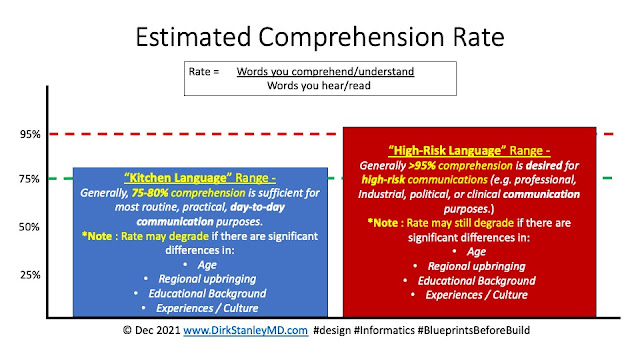
One of the things you learn from this sort of cross-cultural upbringing is that communication is actually much more frail and fragile than you might imagine. Success often depends on a number of factors helping you achieve a desired comprehension rate

For most routine, practical, day-to-day communications, about 75%-80% comprehension is just fine. Typically, your brain fills in the gaps (without your awareness), and you usually don't even notice the small details you might have missed. It still gets you to work, gets you to dinner on time, lets you order food at restaurants, and lets you manage your typical day-to-day activities. Informally, I personally refer to this as "Kitchen Language", since it's what you'd typically hear in a kitchen when people are making dinner and talking about their day. Failures sometimes happen, but when they do - they usually only result in some brief confusion, a wrong or forgotten birthday gift, or an impromptu discussion about 'ineffective communication' from a loved one. After a little more discussion - The error or conflict usually gets resolved. Failure is usually pretty well-tolerated.

And then there is another standard, which I informally call "High Risk Language". This is where failure is NOT well-tolerated, and so additional work and terminology are commonly required to help ensure a higher accuracy rate, typically >90-95%. Political, industrial, and clinical discussions all fall into this range. Successfully navigating High-Risk Language often requires additional analysis/planning, work, and often even new terminology that both sides (separately) agree to and understand, to help align concepts for effective cross-cultural communication.

*Interesting historical side-note : 
Ever wonder about the June 1961 Cuban Missile summit between Kennedy and Kruschev? Viktor Sukhodrev was the interpreter in between them - Talk about responsibility for ensuring both accurate translation and comprehension!

Don't believe me that age is an important factor in effective communication, even in the same language? Check out this Saturday Night Live skit, "Gen Z Hospital" - Your appreciation of this skit will largely depend on the year you were born. Similarly, different upbringings, experiences, education, and culture can also quietly degrade comprehension rates, sometimes to the point of failure. (Applied Clinical Informaticists often see this cultural boundary when translating across clinical and administrative realms, which both have their own culture and terminology.)

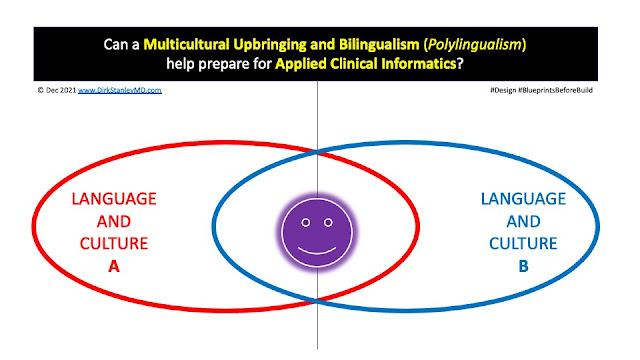
So to overcome these differences across different languages - for both Kitchen Language and High-Risk Language scenarios - good interpreters need to know how different people speak and write. They need to know different cultures and subcultures, and the specific context and nuances of the language they use in each culture

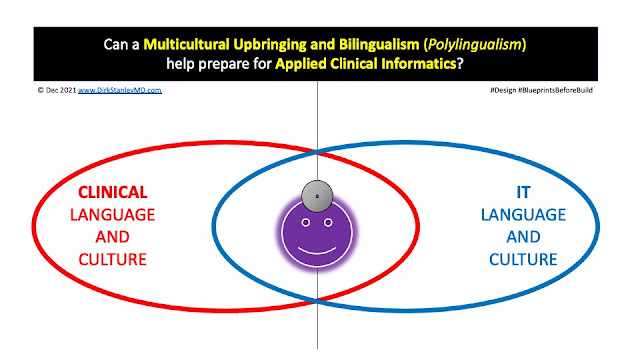
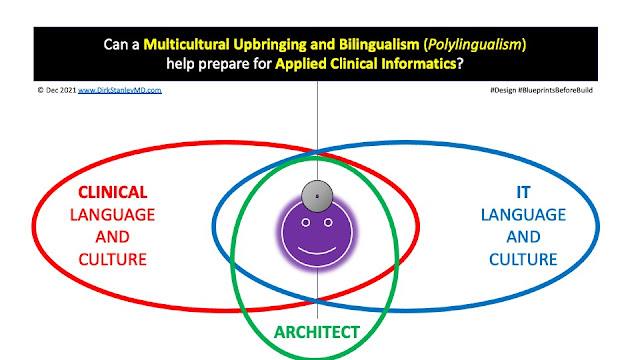
I think this may be why I notice a lot of multicultural, polylingual people in Applied Clinical Informatics. Even in English, this sort of cross-cultural interpretation requires an understanding of two different cultures - Both Clinical, and Information Technology (IT) : 

And then once you have mastered the art of interpreting the culture and language of both sides - you can then become even more helpful when you add clinical architecture to your repertoire, developing new terminology and documented 'blueprints' that meet the needs of both sides

So in closing - I'd say a bilingual (or polylingual), multicultural upbringing can serve as an excellent model for the same interpretation functions that Applied Clinical Informaticists provide in their daily work. It would be interesting to do some formal research into these concepts, to help confirm the value of this sort of early training.

Remember, this blog is for education and discussion only - Your mileage may vary!

Have any thoughts or feedback about this post? Did you grow up in a multicultural household, and do you speak multiple languages? Do you find these experiences helped you in your career in Applied Clinical Informatics? If so, please feel free to leave a comment in the comments box below!

Monday, October 12, 2020

Top 15 Signs You May Work in Clinical Informatics

Hi fellow CMIOs, CNIOs, Clinical Informaticists, Clinical Informaticians, and other #workflow and #HealthIT friends,

Over the last 10 years, I've blogged a lot about different topics in applied Clinical Informatics, from change management to glossary development and workflow terminology management, to order set development. And yet, across the industry, it can sometimes be a challenge to find the other people who do this type of work, partly because: 

  • There are some people who 'do Clinical Informatics work', but are not labeled Clinical Informaticists / Clinical Informaticians in their job title. (Some are labeled CMIOs, CNIOs, Directors of Clinical Informatics, Clinical IT Analysts, Business Analysts, etc.)
  • There are some people who do have a job title like 'Clinical Informaticist/Clinical Informatician', but focus their efforts mostly on a particular branch of Informatics, without clear support for the other branches (often due to resource limitations).
  • Some 'Clinical Informatics' people focus their work for only their clinical specialty (e.g. 'Physician Informaticist', 'Nurse Informaticist', etc.)
So since in some regions, applied Clinical Informatics in 2020 still seems to be an emerging field, one that is fortunately becoming more formal and structured with the advance of more formal training and certification programs - I decided to spontaneously write a humorous piece on Twitter that could appeal to the 'Clinical Informaticist' (or 'Clinical Informatician') in all of us : 


Feel free to share with any Clinical Informaticists (
or Clinical Informaticians) you know with a sense of humor! :)

Remember, this blog is for education and discussion purposes only - Your mileage may vary. Have any helpful humor or insights about Clinical Informatics, job titles, and professional development? Feel free to leave them in the comments box below!

Friday, September 11, 2020

How to Untangle a Complex Clinical Workflow

Hi to my fellow #CMIO, #CNIO, #ClinicalInformatics, #Design, #Designthinking, #workflow, and #HealthIT friends,

For today, I thought I'd share an easy trick for untangling even the most complicated clinical workflows. 

Let's say you're asked to help troubleshoot a particularly complicated workflow, where the end-users tell you things like 'It's so complicated, I can't even describe it!', or 'It's very non-linear'. You want to help, but aren't sure where to start. 

Here's my tip : Start by just writing procedures

While many people in the industry commonly write their workflows as 'swimlane' workflow diagrams, I find that these can sometimes quietly have room for error. In the wrong hands, with an untrained eye, it's possible to draw up a swimlane diagram with 'hidden gaps' that are hard-to-spot until you talk through each step in the process, usually with a group of end-users.

Indeed, swimlanes are the usual industry standard for planning or troubleshooting complex workflows, but writing good procedures can be equally as effective, with some added benefits : 

  • Procedures can usually be edited dynamically, on-the-fly, with a group of people (e.g. in a video conference), as an easy way of quickly collecting their understanding of their workflow/process. 
  • Procedures also make it easier to spot missing pieces - If you use my format above, you'll always know when the WHO (stakeholder) is missing, when it's not clear what's a REQUIRED (will) task or an OPTIONAL (may) task, or what exactly the task is. 
  • Procedures can also usually be easily converted into policies or education, for those times when you want a policy to help back up and reinforce your important procedure, or educate it out to the people who need to follow your new workflow/procedure.
  • Procedures are also generally 'naturally lean'. Missing pieces, redundancies, or design problems usually become obvious as you write out the procedure, allowing you to address those questions before you build your new process. 
If you use the procedure outline above, with the optional modifiers - you can even estimate the time it takes to do each task, allowing you to estimate the total time, people, and resources you will need to achieve your desired outcome. This can even be helpful in developing a Total Cost of Ownership (TCO) and Return-on-Investment (ROI) for your workflow.

And it's generally easier to stitch procedures together than it is to try to stitch swimlane workflows, which can take some time to move objects around, edit text, and reformat the diagram. 

Finally - For extra clarity, you can even name your procedures exactly what they are, e.g. : 
  • DRAFT - CURRENT STATE - How to cook good food
  • FINAL - CURRENT STATE - How to cook good food
  • DRAFT - FUTURE STATE - How to cook even better food
  • FINAL - FUTURE STATE - How to cook even better food

If you have any tips you'd like to share for documenting or troubleshooting workflows, feel free to leave them in the comments section below!

Remember, this blog is for educational and discussion purposes only - Your mileage may vary! Please check with your Clinical Informatics, Legal/Compliance, or Clinical Operational leadership before documenting any of your own workflows. If you have any feedback, tips, or tricks you'd like to share - Feel free to leave them in the comments section below!

Thursday, August 13, 2020

Why Terminology Matters

 Hi fellow Clinical Informaticists, CMIOs, CNIOs, and other HealthIT friends,

A short post this time - Just sharing how terminology management can impact EMR usability

Managing an enterprise EMR is a lot like owning a closet. Information is stored in certain virtual 'drawers', where people (users) get used to storing and finding the information they need to do their jobs.

The problem is, just like closets - Exactly where and how people like to store this information is an intensely personal, cognitively-driven process. If you have ever had to share a closet, you probably know how challenging it can be to share a closet with another person. 

Now, imagine having to share a closet with 500 people. The first step would be getting all 500 people together for a meeting, and discussing/reviewing : 

  • Where should we keep the socks?
  • Where should we keep the pants?
  • Where should we keep the shirts?
Some people may have different opinions about where and how to keep things, but ultimately, you will need to make some final, group-based decisions

Still, some people may start working for your company after those group discussions/decisions are made, so it's helpful if you :
  • ... have an easily-identifable pattern associated with your information storage and retrieval, and...
  • ... if you label things correctly
Today's post is really about labeling things correctly. For teaching purposes, I sometimes simplify it as this : 
"Call it what it is."
It can sometimes be difficult to spot terminology issues, so I'll start with a simple hierarchy that helps explain the confusion that can create frustration for end-users :


Keep in mind that these are simple, real-world examples that we are using as proxies for more complicated, real-world clinical scenarios.

In any case - when labeling a button, folder, or other item in an EMR, it's important to have the appropriate level of granularity and accurate clinical terminology, or else you can lead to confusion for end-users : 

Suppose a user is looking for an apple. 

  • In scenario #1 above, if we just refer to apples and oranges as "fruit" - users will need to spend time clicking through both boxes, looking for the apple. It might be in the left box, or the right box - They are both labeled "Box of Fruit", and fruit is not a granular enough term to identify the exact tool the user is looking for (an apple).

  • In scenario #2 above, it's easy to find an apple. The first box is labeled, "Box of Apples".

So it's always very helpful to :

  • understand and anticipate what the user will be looking for, and...
  • understand the clinical terminology and associated hierarchies, and...
  • call it what it is.
Some people might argue "Well, if both apples and oranges are fruit, why not keep them in the same 'fruit' folder?" For sure, there are some scenarios where this may make sense, especially if there are not many items to look for under a folder. 

However, keeping too many items in a folder can also lead to unnecessary time spent looking for things. 

So ideally, especially when storing a large number of items - It's helpful to understand the clinical role, the clinical context, the clinical terminology, and the higher/lower level concepts, to help identify the right term to label buttons in your EMR, for maximum efficiency and less clicks.

Hope this helps shed some light on common terminology issues that every organization has to manage as they configure their EMRs. If you're not sure about a term, reach out to your local Clinical Informaticist for guidance, tips on how to reduce clicks, and other common clinical workflow design issues.

Remember, this blog is for educational/discussion purposes only, and your mileage may vary. If you have any terminology tips or suggestions, please leave them in the comments box below!

Sunday, December 22, 2019

Shifting from Fire Fighting to Fire Prevention

Hi fellow CMIOs, CNIOs, Clinical Informatics friends, and other ClinicalJedi,

Happy holidays! One of my favorite things about working in the healthcare technology industry is meeting all of the other awesome Clinical Informatics professionals who are working hard to keep healthcare running electronically. If you're not already involved in it - The work is hard, and the hours are long. 
I recently had an informal meeting with a number of other Clinical Informatics professionals, and I had to share some thoughts about a great conversation we had as a group. It started with an informal discussion about the necessary 'care and feeding' of an EMR, e.g. : 
(a parody/tongue-in-cheek diagram, my apologies to Sea Monkeys)

... but eventually our informal talk progressed into a much more meaningful discussion : 
"Q: How can Healthcare IT shift from 'fire fighting' to 'fire prevention'?"
Great question! Across the industry, some of us are noticing that a number of people generally feel overwhelmed. Both inside and outside of Clinical IT, some people are  describing things like: 
  • 'I don't feel like we can ever get enough done.'
  • 'It's too hard to make decisions.'
  • 'I come in planning to do A, but then find out we have to do B.'
  • 'I just built this - but now it has to be changed again.'
  • 'Why doesn't it just do what it's supposed to?'
These statements are all symptoms of a larger problem - Insufficient infrastructure to maintain your EMR. What do I mean by the infrastructure needed to maintain an EMR? I've never found much written about this, but generally I'm talking about things like : 

[ DRAFT ] LIST – Operational infrastructure needed for maintaining an EMR
www.dirkstanley.com (c) 2019 DirkMD
  1. Clinical/Administrative Governance – Strategy for how to make synchronous organizational decisions that align clinical, administrative, IT, and sometimes research/educational stakeholders.
  2. Data Governance – Strategy for how to define and standardize important concepts and terminology across the organization, formally review/approve requests for information, and use data/information as a strategic asset.
  3. Terminology Management Strategy – Strategy for how to manage and standardize terminology, concepts, and hierarchies in your organization.
  4. Policy Management Strategy – Strategy for how to draft, review, approve, modify, publish, and archive policy standards in your organization.
  5. Document Management Strategy – Strategy for how to create, modify, and archive EMR-related (clinical) and non-EMR-related (administrative) documents in your organization.
  6. Project Intake Strategy – Strategy for how to have a single point-of-entry to document and analyze project requests, with a preliminary project scope, risk evaluation, Return on Investment (ROI), Total Cost of Ownership (TCO), and other important factors BEFORE prioritization
  7. Project Prioritization Strategy – Strategy for how to review, prioritize, and approve projects that have been analyzed during your project intake strategy (above).
  8. Project Management Strategy - Strategy for how to manage small, medium, and large projects with routine and urgent priorities.
  9. Design, Build, and Testing Strategies - Strategies for designing workflows, building workflows, and testing workflows (prior to education, implementation, and support)  
  10. Change Management Strategy – Strategy for how to make workflow improvements/enhancements without significant disruptions to clinical care.
  11. Change Control Strategy – Strategy for how to implement changes across both EMR-related and non-EMR-related environments, without disrupting other people/projects
  12. Educational Strategy – Strategy for how to train clinical/administrative users of your EMR.
  13. Communication Strategy – Strategy for how to communicate important items with the clinical/administrative users of your EMR.
  14. Application Support Strategy - Strategy for how to provide elbow-to-elbow, help desk, and other application support for your users.
  15. Content Management Strategy – Strategy for how to maintain the clinical content configured in your EMR (E.g. How will you update your order sets? Make formulary/payor updates? Manage urgent regulatory or safety issues?)
  16. Business Continuity Strategy – Strategy for how to maintain clinical operations when your EMR is down for planned/unplanned downtimes.
  17. Onboarding Strategy – Strategy for how to document and share information related to new clinical and administrative users for your EMR. (Often tied together with your credentialing process.)
  18. Offboarding Strategy – Strategy for how to document and share information related to clinical and administrative users who are leaving your organization.
  19. Reporting/Analytics Strategy - Strategy for reporting and analyzing information from your EMR, for departmental, organizational, local, and regional purposes.
  20. Patient Portal/Engagement Strategy - Strategy for engaging patients and releasing information to your patient portal.
  21. Provider Engagement Strategy - Strategy for engaging clinical staff (Physicians, Nurses, Advanced Practice Providers, and other clinical staff) in workflow discussions and EMR-related projects.
  22. Technology Procurement Strategy - Strategy for managing technology purchases (both hardware and software), to help ensure the implementation cost and total cost of ownership are both understood before purchase
  23. Practice Procurement Strategy - Strategy for procuring new practices (e.g. those that want to join your network), to convert over their data, terminology, and practices to meet the needs of your organization. 

 ... and more. 


These are all important parts of maintaining a healthy EMR, and many organizations already have a lot of these pieces in place - but they are usually not an area of intense focus until an organization becomes more mature with their understanding of technology. Unfortunately, until then, the environment can feel a bit chaotic and unstable. This is all part of the road from implementation, to stabilization, to optimization

This is one of the reasons why it's important to acknowledge that the CIO, CMIO, CNIO, Clinical Informatics, and Health IT staff need to focus on more than just what's inside the EMR - The processes and tools outside the EMR are just as important as the ones inside the EMR. If they do not have influence over those tools and processes outside the EMR, then they cannot align expectations with EMR configurations, and user satisfaction and productivity will drop. 

As it's often been said - Clinical Informatics technically has nothing to do with technology. It is more about information architecture, the processes external to the EMR, and how they impact the configurations inside the medical record. The same work would apply in a hospital with a paper record - Only, as we know, paper is more forgiving about workflow inconsistencies, so the need for this infrastructure is not as great. (Metaphorically, paper is like building with marshmallows, and EMRs are like building with bricks.)

So as a CMIO, about half of my work is managing expectations and configurations inside the EMR, and half of it is working on these sorts of external infrastructure enhancements. 
"A: Strategic Planning."
If having this infrastructure in place helps prevent 'fire fighting' (E.g. Frustrated users, slow projects, unanticipated outcomes, workflow inconsistencies, rebuilds, etc.) - Then the simple strategic initiative needs to come from a gradual focus on fire prevention strategies (e.g. building this infrastructure).

It can be hard to do this when resources are tight, but it starts with strategic planning - making a 6-month, 12-month, and 18-month strategic plan - E.g. :

[ DRAFT ] PLAN - Sample strategic plan to build EMR infrastructure 
www.dirkstanley.com (c) 2019 DirkMD
  • Next 6 months - Will spend 4 hours a week on infrastructure enhancements ('fire-prevention' strategies)
  • 6 - 12 months - Will spend 8 hours a week on infrastructure enhancements ('fire-prevention' strategies)
  • 12-18 months - Will spend 12 hours a week on infrastructure enhancements ('fire-prevention' strategies)
Alternatively, if you have additional resources available, it could be helpful to have a separate team to focus only on developing infrastructure, so that your internal resources are not disrupted from the routine day-to-day activities needed to keep your system operational.

Either way, I believe that fire prevention is always more cost-effective than fire-fighting, and will help you to better realize the potential benefits of your EMR - so if you need help developing this infrastructure, I believe the investment is well-worth it.

Hope this helps you develop your own strategy for stabilizing and optimizing your EMR. Remember, half of the work is inside your EMR, and half of it is outside. 

Have any tips for developing infrastructure or stabilization/optimization strategies? Feel free to leave in the comments section below!
Remember, the above is for educational discussion only - Your mileage may vary. Always review with your operational, legal/compliance, IT, Clinical Informatics, and Senior Leadership before undertaking any of these discussions in your own organization.