Showing posts with label #ClinicalInformatics. Show all posts

Thursday, December 18, 2025

The Well-Tempered #HealthIT Department Index

Hi fellow CMIOs, CNIOs, workflow gurus, and other Applied Clinical Informatics friends,

I'm writing today to share an interesting design I developed to help HealthIT departments to better organize, understand each other, and share information in a more organized way.

Animated GIF for easy sharing

Coming up with an organizational index like this requires a lot of thought about :

  • Q1 : What does it take to run a standard HealthIT department (for both large Academic Medical Centers that often conduct research/clinical trials, and non-Academic, community health centers)?
  • Q2 : Who are the common team members (and teams), and how are they organized?
  • Q3 : How do they work together?
  • Q4 : Who do they serve, and how?
  • Q5 : Is the departmental model scalable/expandable, as an organization grows (or partners with other organizations)?
In short - Many #HealthIT departments have a group demand for a lot of information sharing, but there's not a lot of consensus on exactly how to do this. While I've seen different attempts at 'organizing this closet', many of the designs I've seen are either : 
  • [   ] too coarse (everything in one disorganized, central file space, with people using alpha-search and AI to try to find files)
  • [   ] too granular (everything in filed in many separate, distributed folders, sometimes down to the individual user, with people using alpha-search and AI to try to find files)
The challenge is to find the 'goldilocks' folder structure, just intuitive enough that everyone can find their way around, and yet flexible enough to scale as an organization grows. Neither too many folders, nor too few, are desirable.

*Interesting side-note : For those of you who might be classical music fans - This indexing challenge is somewhat reminiscent of Bach's Well-Tempered Clavier, which was his answer to the 1700s question of 'Exactly how many notes do we need in a scale?' For more on this fascinating challenge, and how Bach solved it - and its long-standing impact on modern music - see this YouTube video : https://youtu.be/NCMrHkMCeXk 

So after a lot of discussion, review, and validation with other HealthIT and other Clinical Informatics leaders, I think I've come up with a fairly reasonable design for organizing all of this that is fairly simple, organized, intuitive, and scalable as an organization grows.

It's a simple hub-and-spoke model - One hub, and nine spokes. Remember - This is just a proposed model, and your mileage may vary. Let's look at them in more detail, for your consideration and feedback : 

A. THE HUB : Your #HealthIT Department (Leadership) Homepage

This is the primary welcome page for your staff to arrive in your departmental development space, and gives everyone one-step, easy-access to common departmental materials like :

  • Important news and departmental announcements
  • IT Portfolio
  • IT Roadmaps (including Administrative, Clinical, Research, and Academic)
  • IT Policies, Standards, Templates, Forms, and Terminology (this also includes departmental file naming conventions)
  • AI Strategy, Governance Committees, and Oversight
  • IT Intake and Procurement
  • IT Org Charts
A1. SPOKE 1 : Your Administrative IT Application Dev/Support Homepage

This is where your Administrative IT Application team will support common Administrative systems, like : 
  • Email Server
  • Web Services (includes Intranet and Extranet services)
  • Safety / Security Systems
  • Human Resources (Timekeeping, Payroll, etc.)
  • Official Document Management (e.g. Policies, Bylaws, Guidelines, Protocols, etc.)
  • Finance Systems
  • Revenue Cycle
  • Billing Systems
  • Provider Credentialing / Med Staff Office systems
  • Other Credentialing / Human Resources
  • Contracting
  • Facilities Management
  • Supply Chain / Procurement
  • ... and other Administrative Systems

A2. SPOKE 2 : Your Clinical IT Application Dev/Support Homepage


This is an important page, and based on the informal, de-facto NIST/HITRUST-supported criteria for Academic Medical Centers, this is likely to contain support for : 
  • Your Tier 0 systems (downtime tolerance=minutes), including your central Bed Monitoring, Telemetry, Secure Chat, Core EHR production, Pharmacy Systems (order verification, dispensing), Radiology PACS/Imaging Views, Laboratory Systems (e.g. critical analyzers), ADT/Identity/Registration services, and Clinical Authentication (SSO, badge-tap)
  • Your Tier 1 systems (downtime tolerance=few hours), including your clinical documentation modules, OR scheduling systems, ED tracking boards, Clinical Decision Support engines, routine (non-STAT) results reporting, and Interface engines supporting clinical data flow
  • Your Tier 2 systems (downtime tolerance = few days), including your Revenue cycle systems, billing and claims, Enterprise Resource Planning / Supply Chain, non-clinical scheduling, Data warehouses
  • Your Primary EHR and common support teams, including core and 3rd party Pharmacy, Lab, Radiology, and other specialty systems for Inpatient, ED, Perioperative, Ambulatory Procedural Suites, Ambulatory Clinics, and Homecare functions
  • Your 3rd Party ('bolt on') Applications in your various clinical areas, and the administrators / developers for each one
  • Your Applied Clinical Informatics / Workflow Analyst Development Spaces (e.g. for your Ordering/CPOE projects, Workflow Projects, and Clinical Decision Support (CDS) project analyses)

Carefully planning this Clinical IT page, with cross-referencing hyperlinks, can turn this page from a file storage area into a knowledge base and tool of learning and understanding. 

A3 : SPOKE3 : Your Research IT Application Dev/Support Homepage


If you are an Academic Medical Center that does clinical research (clinical trials), this is the page for your team members who support your Research IT applications, including :
  • Your Core Research Labs/Areas
  • Your Independent Review Board systems
  • Your Clinical Trials Management (CTMS) system(s)
  • Your Research Compliance
  • Your Research Committees and Governance
  • Your High-Performance Computing (if available)
  • Your Research Analytics Systems
  • Your Data Science / Translational Science Systems
  • ... and other Research systems

A4 : SPOKE4 : Your Academic IT Application Dev/Support Homepage


If you are an Academic Medical Center with an academic mission, this is the page for your Academic IT systems including : 
  • Academic Administration Systems
  • Academic Registration Systems
  • Academic Scheduling Systems
  • Academic Grading/Scoring Systems
  • Learning / Simulation Systems
  • Graduate Medical/Dental/Nursing/Pharmacy Education
  • Continuing Medical/Dental/Nursing/Pharmacy Education
  • Undergraduate Medical/Dental/Nursing/Pharmacy Education
  • ... and other Academic IT systems

A5 : SPOKE5 : Your IT Project Management Office (PMO) Homepage


Most HealthIT departments of sufficient size have a formal Project Management Office (PMO). If you have a PMO, you will need a page for PMO team members (and the many people who interact with the PMO and active projects), so this page could include : 
  • Project Intake
  • Prioritization Rubrice
  • Project Governance
  • Project Utilization Dashboards
  • Project Templates
  • Project Development Folders/Spaces
  • Other Project Management Office (PMO) Tools
A6 : SPOKE6 : Your Enterprise Technology (Infrastructure) Dev/Support Homepage


This is where your Enterprise Technology (Infrastructure) Development and Support teams could easily find folders and supporting materials for : 
  • Platform & Middleware Layer Applications (e.g. Windows/OS, Citrix, Virtualization/VM Ware, Interface engines, batch jobs, schedulers, and data warehousing)
  • Identity and Security Layer Applications (e.g. Active Directory, SSO/MFA, Certificate services, etc.)
  • Network and Firewall Layer Applications (e.g. Wireless, switches, routers, VPN, firewall, etc.)
  • Physical Layer Applications (e.g. HVAC, cooling systems, fire suppression, telecom, elevators, electric grid, backup generators)
A7 : SPOKE7 : Your Business Intelligence, Reporting, and Analytics Homepage


This is where your Business Intelligence, Reporting, and Analytics team members could support your : 
  • Administrative Reporting and Analytics - E.g. for HR, Legal, Finance, Compliance, or other Administrative purposes
  • Clinical Reporting and Analytics - E.g. for Clinical, Quality, Operational, Scheduling, or Billing/Operational purposes
  • Research Reporting and Analytics - E.g. for Research purposes, Clinical Trials, IRB support, Research Compliance support, etc.
  • Academic Reporting and Analytics - E.g. for Academic/Educational purposes, Academic research projects, etc. 

A8 : SPOKE8 : Your IT Security and Privacy Team Dev/Support Homepage


This is where your IT Security Team could find and develop important IT security materials including : 
  • Role-Based Security Templates
  • Incident Reporting
  • Account and Access Security (includes Onboarding/Offboarding and Role Changes)
  • Security, Privacy, and Data Protection Policies
  • Governance Committees and Leadership
  • Multifactor Authentication (MFA) support
  • Single Signon (SSO) support
  • Security Training and Awareness Materials
  • Other IT Security applications and files

A9 : SPOKE9 : Your IT Customer Service & Support (Service Desk)


This is where your IT Customer Service and Support (IT Service Desk) Team members (and others) could easily access helpful materials like : 
  • IT Support Ticketing Systems
  • Triage protocols
  • Self-Service / Quick fixes
  • Escalation Pathways
  • Major Incident Board
  • Status Board
  • Outages / Alerts
  • Known Issues
  • Requests & Lifecycle Services
  • Lost Equipment Reporting
  • Data breach Reporting systems
  • Planned Downtime Policies
  • Unplanned Downtime Policies
SCALING / GROWTH : 
Assuming your team chooses to adopt this model for your organization, you could easily expand/scale this model to additional partner organizations, through a simple set of hyperlinks from these pages, e.g. : 
  • [ Organization A : Project Management Page ] 
  • [ Organization B : Project Management Page ] 
  • [ Organization C : Project Management Page ] 
In this way, each organization would have a clean page for their own unique needs, while keeping all of the Project Management pages closely linked and aligned in expectations. (This would allow you to gradually continue to align, as organizations mature.)

SOME FINAL THOUGHTS : 
This is just a sample model, that I thought I'd share for friendly review, discussion, and feedback. If nothing else, I hope this has been a fun and helpful journey navigating through the most common functions, teams, and roles of #HealthIT, and welcome feedback or comments from others who have already explored this journey.

Remember : This blog is for academic and educational discussions only - Your mileage may vary. Have any feedback or suggestions? Leave in the comments section below!

Sunday, March 17, 2024

Developing and Approving an Order Set

Hi fellow CMIOs, CNIOs, and other Clinical #Informatics and #HealthIT friends,

Today I thought I'd share some helpful slides from a discussion that very few people write about - Developing and approving order sets.

This is a topic where far too little has been shared openly, so many organizations struggle unnecessarily until they learn through repeated trial-and-error how to do this in a much more smooth, efficient way.

Unfortunately, it also brings up the question about maintenance of order sets : 

  • Yes, order sets can help save time, reduce clicks, and reduce unexpected pages from staff, but...
  • They can also take a lot of work to develop, approve, monitor, and maintain.

So our agenda for today includes : 

First, what exactly do we mean by 'Order Sets'?

Order sets are sometimes referred to as 'Ordering Tools', since different vendors use different terminology to describe these collections of orders that are used to standardize and expedite the ordering process for a common, well-described clinical scenario.

Because they look so similar (and even share some of their definitions!), Order sets are sometimes confused for order panels, pick-lists, and clinical pathways:

  1. Order Set (n.) - A collection of orders used to standardize the ordering process for a common, well-described clinical scenario (e.g. workup, treatment, admission, discharge, prep, postop, protocols, etc for pediatric and adult/geriatric patients.)
  2. Order Panel (n.) - A collection of common orders of a specific type, typically designed for inclusion in order sets (e.g. common pain meds, common GI meds, common labs, common nursing orders)
  3. Pick-List (aka 'Quick Preference List' or 'Convenience Panels') (n.) - A collection of common orders of a specific type, typically designed for convenience only, that is not related to a specific, well-described clinical scenario (e.g. common pain meds, common IV fluids, common anti-emetics, common lab orders, common radiology orders, etc.)
  4. Clinical Pathway (n.) - A collection of order sets used to standardize and expedite the daily ordering process (typically throughout the course of a planned hospitalization) for a defined clinical condition, procedure, or surgery.

Order sets also typically come in two types

  • Oncology Order Sets - Typically broken out in a separate category, because of the unique, complex ordering needs for chemotherapy and biologic infusions (e.g. monoclonal antibodies)
  • All other Order Sets (General order sets) - Typically related to working up common chief complaints, treating common conditions/diseases, admitting/transferring/discharging to/from an inpatient area, preparing for a surgery/procedure, recovering from a surgery/procedure, and special protocols (to automate common, high-risk clinical scenarios where the benefits of standardization and timely delivery of care outweigh any known risks).

For this purposes of this post, we will mostly be discussing the second category above - General order sets. (We could write a whole separate post about the unique needs of Oncology and biologic infusion ordering workflows.)

So before we get to our development discussion, let's first start with our approval discussion - In a typical healthcare organization, who is best-suited to approve an order set?

Many organizations struggle with this question, because there's usually no one person who has all of the time, expertise, and authority needed to approve an order set. I sometimes describe this as the 'Captain Kirk and Scotty' paradox

  • Captain Kirk = Has all the authority, but little expertise
  • Scotty and engineers = Have all the expertise, but little authority

So ultimately, the lesson here is : Captain Kirk, Scotty, and the other engineers have to work together to make the ship run.

Some organizations chose to focus on expediency, by assigning one person or one team - sometimes a clinical officer (CMO, CNO, or both?) or an appointed committee (chaired by a CMO, CNO, CMIO, and/or CNIO?) - But is that enough? Are there any helpful regulations or published best practices, and if so, what do they say?

Unfortunately, there's not much. As of 2024, order sets are still a bit of a mystery to most regulatory agencies. Not only does CMS use the terms "Standing Orders", "Order Sets", and "Protocols" interchangeably, but there are very few published best practices openly available on the Internet. The OHSU ClinfoWiki has some helpful information about oversight and governance in these published pieces :

... but while there's some helpful information about oversight committees and mentions of templates, these articles don't contain much concrete detail about the exact development or approval processes, or samples of templates.

So the most concrete regulatory guidance seems to come from the Centers for Medicaid Services (CMS) 42 CFR § 482.24, under section (3) which states : 

So if CMS expects the Medical Staff and the hospital's Nursing and Pharmacy leadership to be 'reviewing' order sets - Does that mean three committees need to be involved in the review/approval process? (E.g. Medical Board/Medical Executive Committee, Nursing Council, and Pharmacy and Therapeutics?) Or should those committees delegate a separate team to just focus on order sets? 

Or should the clinical leadership of those areas (e.g. CMO, CNO, and VP of Pharmacy) approve the order sets? Even if they have the time and expertise to approve order sets, do they have the time to develop them? And if they don't have the time and bandwidth to 'get into the weeds' to develop them, how can they feel confident about approving them?

And what about the other supporting departments in a clinical enterprise - Laboratory, Radiology, and other ancillary services? When the OHSU ClinfoWiki article on "Creating Order Sets" says, "They have their needs thoroughly examined by their practice management oversight group, nursing, support staff and anyone who might be affected by the order set," who exactly might be affected by the order set? After all, don't doctors just write orders, and other people in the organization have to execute/follow-through with them?

Well, it's not that simple. Clinical staff affected by the order set include both

  • The staff writing/creating orders (typically Ordering Providers, including Attendings, Residents/Fellows, Advanced Practice Providers/APRNs/PAs/CRNAs etc.)
  • The staff following/executing orders (commonly everyone else in a clinical enterprise, including Nursing, Pharmacy, Lab, Radiology, Bed Management, Case Management, Dietary/Nutrition, and other ancillary support services)

Some doctors initially bristle when they learn that other specialties are involved in reviewing and approving their order sets. But if we take a step back - Order sets create patterns of clinical care and utilization that have an impact across the whole organization, so it shouldn't be a surprise that other people are involved in reviewing the best practices, and planning utilization and resource needs to execute and follow-through with those orders.

So how do we make sense of this? It helps to imagine a 'pyramid' of delegation and oversight, one that helps to connect Captain Kirk (all authority, little expertise) with Scotty and his engineers (all expertise, little authority) :

... which is a very basic operational unit that can be employed in developing a process for reviewing and approving order sets. So in a typical clinical enterprise, there are similar pyramids for the major clinical disciplines involved in the delivery of care (Nursing, Pharmacy, and Physicians):

Note there are also similar pyramids for Lab, Radiology, and other Ancillary Services (such as Physical Therapy, Occupational Therapy, Dietary/Nutrition, Case Management, Social Work, etc.) :

So now, let's see if we can answer the question : Who exactly is affected by an order set? Well it depends largely on the complexity of your order set. Small, short order sets typically have fewer stakeholders, and larger, complex order sets typically have more

Exactly who needs to participate in the discussion will depend on the type(s) of orders in your order set. You can create a very helpful order set development template by identifying and aggregating your most common order types. Most healthcare organizations can divide up all patient care orders into one of sixteen (16) groups

Since each order type has a unique function, usually executed/performed by a unique stakeholder - You can then take these sixteen (16) order types, import them into a spreadsheet, and next identify the common stakeholders for each order type

Once you've identified the common stakeholders for each order type, you can then create a standardized order set template, that not only helps define expected standards for each order type (e.g. medication orders with medication doses, routes, frequencies, etc.), but also the stakeholders necessary to participate in the review and approval of the order set :

Once you have this template, you can first try it out with a simple order set, say, with just a Procedure order, some Activity and Nursing orders, some Diet orders, and some IV fluid orders :

Or, you can try it with a more complex order set, one that includes : ADT orders, Code Status orders, Procedure orders, Activity orders, Blood Bank orders, Nursing orders, Diet orders, IV Fluid orders, Medication orders, Laboratory orders, Diagnostic Radiology orders, Consult/Referral orders, and Discharge Education orders -

This is helpful when trying to plan new order sets, so you can identify who to invite to your build discussions.

Now, since I'm discussing order sets, I thought it would be helpful to mention the surprising importance of solid, well-planned naming conventions

Early in my Informatics career, I would have never have guessed the importance of naming conventions. A few people warned me, but at first I was skeptical. I actually once said something like this : "What does it matter, what you call it? As long as they can find it!"

What I didn't know at the time (and learned with experience) is that naming conventions

  • Determine the size of your order set library - More coarse/vague naming conventions result in fewer order sets, and more specific/granular naming conventions result in more order sets.
  • Determine how easy it will be for your users to find (and bookmark) the order set.
  • Help determine whether you are clearly building a time-saving order set - Or if you are confusing it for a Pick-List, Order Panel, or Clinical Pathway
  • Strongly influence the number of clicks and unexpected pages your users will experience - The more clear and specific the naming convention is, the more you can pre-configure and pre-click default settings (so your users don't have to!)
Knowing that well-described, scenario-specific order sets help reduce clicks and unexpected pages more than general Pick-Lists (aka 'quick preference lists' or 'convenience panels'), I thought I'd share one way to index your order set catalog, based on your most common patient types, common chief complaints, common treatments, common surgeries and procedures, and common protocols :

So with that - First, some helpful take-home reminders

... and a few more to consider as you create and develop your governance and order set development, review, and approval processes with your Clinical, Legal, Compliance/Regulatory, Finance, and other leadership :


I hope this quick review has been helpful and provides some helpful food for thought for your own team discussions! Since there is not much written about this subject, please feel free to share feedback in the comments section below.

Remember, this blog is for educational and discussion purposes only - Your mileage may vary!
Have any experiences building order sets, leading order set teams, or creating or an order set development and approval process? Feel free to share any helpful feedback or experiences in the comments section below! 

Friday, February 23, 2024

Why Healthcare needs Clinical Architects

Hi fellow CMIOs, CNIOs, and other Clinical Informatics friends,

Some of you might already be familiar with #BlueprintsBeforeBuild, the hashtag I started several years ago (on X/Twitter, LinkedIn, and elsewhere) to help create awareness of the need for good workflow design in healthcare technology. 

You might also be aware of the value of having an Applied Clinical Informatics ('Clinical Architecture') team in Healthcare, to assist with things like : 

  1. Project Intake or Procurements that require additional support or workflow evaluations, to help ensure the technology does not already exist, and to help ensure proper scoping, budgeting, stakeholder identification, resource allocation, necessary safety, compliance, and regulatory reviews, and expected outcomes.
  2. Special Event Workflow Planning (e.g. Planned upgrades and maintenance, unplanned downtimes, project go-lives, etc.)
  3. Complex IT Tickets that require workflow updates or modifications (which often span multiple areas with multiple stakeholders)
  4. Complex Projects that require clinical translation, terminology work, stakeholder alignment, or other workflow updates/modifications
  5. Ongoing Maintenance of existing configuration / workflows to meet CMS/TJC regulations, that require continuous staff engagement with multiple stakeholders across different areas and specialties. 
  6. Helping to ensure clinical workflows are aligned with the Clinical, Administrative, HIM, Regulatory/Compliance, coding/billing, and revenue capture needs of the organization. 
So while my last post helped to ask and answer the question, "Where is the Clinical Informaticist?", this month's post is related to my support of an easy way to make Applied Clinical Informatics more familiar and tangible for newcomers - Instead of "Clinical Informatics", consider using the synonyms "Clinical Architect" and "Clinical Architecture" :
 

While some organizations have clinical staff (MDs, RNs, APRNs, PAs, Pharmacists, Lab/Radiology staff, and others) who are trained to configure computers, other healthcare administrators might question the reasons for paying a clinical team member to do this sort of configuration (building) : 

Q : "Why should we pay a doctor (or RN, APP, or other clinical role) to do this?"

In addition to the six deliverables mentioned above, there are other good reasons to pay clinical staff to be involved in your EMR go-live, configuration, and ongoing maintenance, including :

  • Improved user satisfaction and workflow design (See this recent AMA article for a success story from TSPMG on the benefits of improved user engagement!)
  • Improved upkeep of technology (to reflect continuously-changing medical literature and other clinical, regulatory, and billing standards)
  • Improved utilization (ROI) and stewardship of your technology
  • Improved quality metrics and revenue capture
  • Improved patient care
  • Improved patient satisfaction
... where clinical staff play an essential role in experiencing and understanding their workflows, translating their workflows, and maintaining their workflows. The questions then become : 
  • Q : "Do we need clinical staff to build configurations?" ('Clinical Builder')
  • Q : "Or do we need them to architect clinical workflows?" ('Clinical Architect')
While many clinical staff begin their HealthIT journeys focused on build - I would argue that there is a value in focusing their efforts on clinical architecture, rather than construction. Here's why.

Effective, predictable change management generally begins with a ten step process :


Generally speaking, these ten steps include : 
  1. Documenting and understanding the change.
  2. Analyzing, evaluating, designing, and scoping the change.
  3. Prioritizing and approving the change project.
  4. Building the project team (including stakeholders, deliverables, and timelines).
  5. Designing blueprints for all EMR/Non-EMR deliverables (for discussions, tabletop exercises, edits, and to secure necessary buy-in and approvals)
  6. Building the change (Analyst)
  7. Testing and approving the change (future-state workflow)
  8. Communicating and educating (training) the change
  9. Implementing the change
  10. Monitoring and supporting the change
After reviewing these steps, the questions then become : 
  • Who supports each of these steps?
  • Do your IT Analysts typically support step #6?
  • If so, are your clinical staff then more useful in step #6, or in steps #2 and #5?
  • Could any analyst time be saved in #6 with more informatics time spent in #2 and #5?
This may seem somewhat paradoxical at first, since many clinical staff initially gravitate towards building when they first get involved in healthcare technology. After all, it seems like a good way to get involved, learn about data structures, and get some control over the systems they use to deliver care to patients. 

But on closer inspection, I believe there's real value in focusing your clinical staff on architecture, rather than construction (build) : 


From Wikipedia : Architecture is the art and technique of designing and building, as distinguished from the skills associated with construction. And what connects architecture to construction is blueprints. (Note : For more about architecture, please also see this helpful Brittanica article.)

So for most clinical staff first getting involved in HealthIT, having some experiences with construction is very helpful. Unless they have some kind of a background in computer science, it's still very helpful (foundational) to learn about data structures, relational databases, indexing, and coding. 

But once they have this foundational understanding, I personally think their bigger value comes from using their clinical expertise to architect workflows using blueprints, rather than building (configuring) workflows. Here's why : The value of blueprints in construction is typically underestimated :
  • Blueprints allow you to quickly mock up deliverables (e.g. the EMR and non-EMR deliverables that work together to support your desired workflow)
  • They let you share your mockups with other clinical staff, to discuss, review, create tabletop exercises, make edits, and secure necessary buy-in and formal approvals.
  • They let you then share your approved blueprints with your IT analysts (who can then quickly create the electronic deliverables in your EMR, e.g. orders, order sets, clinical documentation, alerts, charges, etc.)
  • They let you share your approved mockups with other Clinical Leaders (who can then help create the non-EMR deliverables, such as policies, guidelines, protocols, schedules, training, budgets, etc.)
  • Finally, blueprints can also help save analyst time while synchronizing your electronic (EMR) deliverables with your paper deliverables (downtime forms).

How can blueprints help save analyst time, while synchronizing your electronic and paper deliverables (for planned EMR maintenance / unplanned EMR downtimes)? They can do this because blueprints help to create clear understanding and discussions, and allow clear edits and revisions, that are necessary before you can secure the necessary buy-in and final approvals - Not just from your clinical staff, but also from your Legal/Compliance/Regulatory staff, Pharmacy staff, Nursing staff, Radiology staff, Laboratory staff, HIM staff, Billing/Coding staff, Clinical Leadership, IT leadership, etc. 

Having that level of clarity, understanding, and buy-in is very difficult to achieve after something has been built. (This is a common reason for IT Analyst complaints of having to build and re-build something before it's right.) So why not put your Clinical Architects (Clinical Informaticists) to work on blueprints, rather than build?

And so once your IT analysts are working on the electronic (EMR) deliverables, blueprints are then also very easy to convert to paper downtime forms :


So that process for creating synchronized EMR deliverables (from an IT Analyst) and paper downtime forms (from a Clinical Architect / Clinical Informaticist) can then look like this : 


How to use blueprints to create matching paper and electronic tools : 
  1. Clinical Architect (Clinical Informaticist) will study and design the desired (future-state) workflow. 
  2. Clinical Architect (Clinical Informaticist) will use templates to quickly mock-up blueprints for all deliverables. 
  3. Clinical Architect (Clinical Informaticist) will use blueprints to review and share with staff and other stakeholders, conduct tabletop exercises, lead clear discussions, make necessary edits/changes based on feedback, and secure the necessary buy-in and approvals.
  4. Clinical Architect (Clinical Informaticist) will share and discuss approved blueprints with IT Analyst, for building and testing of electronic deliverables.
  5. Clinical Architect (Clinical Informaticist) will convert blueprints to paper downtime forms.
So to summarize, some key take-home points from today's discussion :
  • There is real value in having (some) clinical staff engaged in the development and ongoing maintenance of your EMR and downtime processes (e.g. improved outcomes, improved user and patient satisfaction, improved quality metrics, improved revenue capture, etc.
  • Clinical architecture (Clinical Informatics) is the art and technique of designing and building clinical workflows, a specialty distinct from (but intrinsically related to) IT Analysts (who commonly focus their primary efforts on construction).
  • Clinical staff commonly begin their HealthIT career journey focused on building in an EMR, but their value can increase when they focus their efforts on clinical architecture (Clinical Informatics) and blueprint development.
  • Blueprints can help save project and IT analyst time by creating the necessary discussions, understanding, buy-in, and approvals before beginning construction.
  • Blueprints can also help synchronize your electronic deliverables with your paper downtime forms (by making it easy to create downtime forms with the same appearance, format, and cadence as your electronic deliverables).
  • An easy way to improve clinical workflow design, improve outcomes and user satisfaction, save time, create clarity and understanding, and develop smooth downtime processes is to develop a Clinical Informatics (Clinical Architecture) team, and remember the hashtag #BlueprintsBeforeBuild!
For many of you, this discussion is probably just a refresher. For others, I hope this was a helpful discussion, for you and/or your clinical informatics teams. Please let me know your experiences, and feel free to leave comments and feedback in the comments section below!

Disclaimer : Remember, this blog is for educational, discussion, and information-sharing purposes only - As always, your mileage may vary! Remember to always have your clinical leadership, IT, and legal/compliance teams review any changes to processes before you initiate them. Have any related experiences, or other suggestions for improving clinical workflow design? Leave your comments and feedback below!
Saturday, March 19, 2022

What Multicultural, Bilingual Clinical Informaticists Know

Hi fellow CMIOs, CNIOs, Clinical Informaticists, and other HealthIT friends,

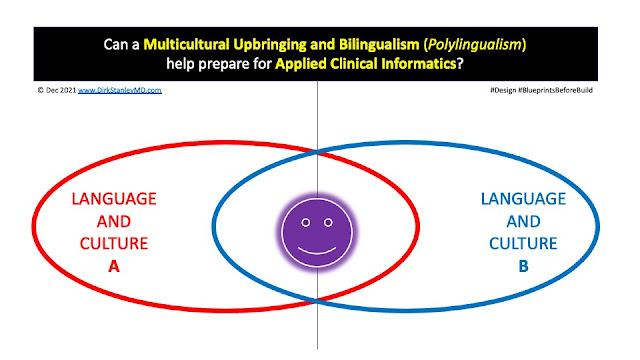
Can growing up in a multicultural, bilingual (or polylingual) household help to prepare you for a career in Applied Clinical Informatics? In today's post, I'll explain why I believe the answer to this is "Yes".

Almost all of my Applied Clinical Informatics colleagues that I've met over the years have amazing educational and experiential backgrounds. However, I've noticed that a surprising number of them also come from multicultural backgrounds, where they grew up speaking multiple languages. 

In full disclosure : I don't have great data to support this claim. And I might be biased (or more sensitive) to this issue because I grew up in a polylingual household myself, the son of a German immigrant mother and a polyglot American father, who counted German as one of this favorite and most fluent languages. 

Left : My father during his US military servjce.
Right : My American father and German immigrant mother, circa 1965. 

My father's passion for languages started as a high school student in Yonkers, NY, and would continue to develop until he became a Military Policeman (MP) for the US Army, in Germany, where he also served as a court interpreter. This would also eventually lead him to meet my mother (who had immigrated from Herford, Germany to Westchester County, NY), and to a future career as a high school language teacher at White Plains High School in White Plains, NY.

So with parents like these, I grew up in a multicultural, multilingual household, where we commonly spoke German at home, and then spoke English when other people came to visit our house. Vacations were often spent visiting relatives in Germany, immersed in German language and culture, before returning to America and resuming daily activities in English.

Given my father's interpreter experiences, he always took languages and translation very seriously. Growing up outside of NYC in the 1970s and 1980s, he would occasionally take me into the city to the United Nations, to learn about and watch the famous UN Interpreter pool at work. Over our dinner table, we would often discuss the inseparable bond between culture and language, the real responsibilities of professional interpreters, and the occasional fallibility of both written and spoken words. 

This sort of cross-cultural upbringing led me to some frequent challenges, that most multicultural people can probably relate to

  • Having to explain "American things" to my German family.
  • Having to explain "German things" to my American friends.
  • Occasionally having to do real-time interpretation of English-to-German, and German-to-English, to facilitate discussions between my German family and American friends.

I didn't fully appreciate this sort of multicultural upbringing until I was older, and learned that not everyone struggled with (or learned to manage) these types of issues. 

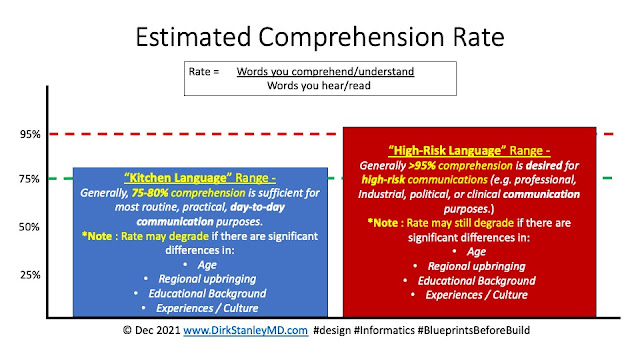
One of the things you learn from this sort of cross-cultural upbringing is that communication is actually much more frail and fragile than you might imagine. Success often depends on a number of factors helping you achieve a desired comprehension rate

For most routine, practical, day-to-day communications, about 75%-80% comprehension is just fine. Typically, your brain fills in the gaps (without your awareness), and you usually don't even notice the small details you might have missed. It still gets you to work, gets you to dinner on time, lets you order food at restaurants, and lets you manage your typical day-to-day activities. Informally, I personally refer to this as "Kitchen Language", since it's what you'd typically hear in a kitchen when people are making dinner and talking about their day. Failures sometimes happen, but when they do - they usually only result in some brief confusion, a wrong or forgotten birthday gift, or an impromptu discussion about 'ineffective communication' from a loved one. After a little more discussion - The error or conflict usually gets resolved. Failure is usually pretty well-tolerated.

And then there is another standard, which I informally call "High Risk Language". This is where failure is NOT well-tolerated, and so additional work and terminology are commonly required to help ensure a higher accuracy rate, typically >90-95%. Political, industrial, and clinical discussions all fall into this range. Successfully navigating High-Risk Language often requires additional analysis/planning, work, and often even new terminology that both sides (separately) agree to and understand, to help align concepts for effective cross-cultural communication.

*Interesting historical side-note : 
Ever wonder about the June 1961 Cuban Missile summit between Kennedy and Kruschev? Viktor Sukhodrev was the interpreter in between them - Talk about responsibility for ensuring both accurate translation and comprehension!

Don't believe me that age is an important factor in effective communication, even in the same language? Check out this Saturday Night Live skit, "Gen Z Hospital" - Your appreciation of this skit will largely depend on the year you were born. Similarly, different upbringings, experiences, education, and culture can also quietly degrade comprehension rates, sometimes to the point of failure. (Applied Clinical Informaticists often see this cultural boundary when translating across clinical and administrative realms, which both have their own culture and terminology.)

So to overcome these differences across different languages - for both Kitchen Language and High-Risk Language scenarios - good interpreters need to know how different people speak and write. They need to know different cultures and subcultures, and the specific context and nuances of the language they use in each culture

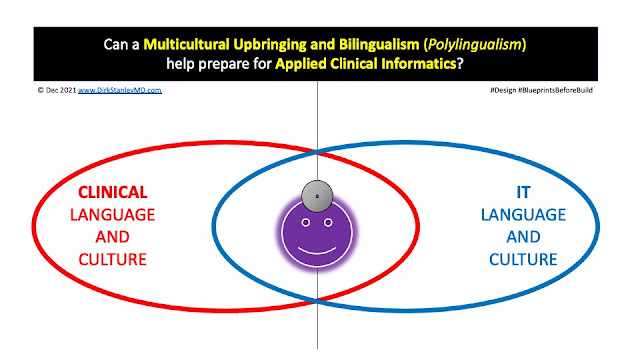
I think this may be why I notice a lot of multicultural, polylingual people in Applied Clinical Informatics. Even in English, this sort of cross-cultural interpretation requires an understanding of two different cultures - Both Clinical, and Information Technology (IT) : 

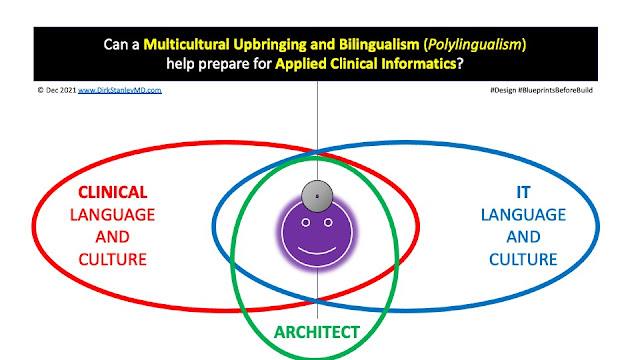
And then once you have mastered the art of interpreting the culture and language of both sides - you can then become even more helpful when you add clinical architecture to your repertoire, developing new terminology and documented 'blueprints' that meet the needs of both sides

So in closing - I'd say a bilingual (or polylingual), multicultural upbringing can serve as an excellent model for the same interpretation functions that Applied Clinical Informaticists provide in their daily work. It would be interesting to do some formal research into these concepts, to help confirm the value of this sort of early training.

Remember, this blog is for education and discussion only - Your mileage may vary!

Have any thoughts or feedback about this post? Did you grow up in a multicultural household, and do you speak multiple languages? Do you find these experiences helped you in your career in Applied Clinical Informatics? If so, please feel free to leave a comment in the comments box below!